Sky SMP combines progression across 10 unique dimensions with an SMP Overworld where you can build a permanent home, protect your land, create shops, trade with other players and build your own community. This guide covers everything you need to get started.
How does Sky SMP work?
Sky SMP has two main parts: the 10 dimensions, where your progression happens, and the Overworld, which is your home. To get to the Overworld, use /rtp. It teleports you to a random spot in the Overworld, ready to explore and find a place to build.
The 10 dimensions
You start in the first dimension and work your way through all 10 by mining resources, leveling up your mining, upgrading your armor and sword, completing progression requirements and unlocking the next dimension. You get stronger as you go.
Each dimension has its own floating islands, resources, mines, equipment and progression.
Your ultimate goal is to reach Fungal, the final dimension.
The Overworld SMP
The Overworld is where the actual SMP side of Sky SMP happens. Type /rtp whenever you want to head there. Instead of hiding your base somewhere like in Shop Survival, you can claim your land and protect everything you build.
In the Overworld you can:
The easiest way to think about it: Dimensions are for mining, progressing, upgrading and unlocking. The Overworld is for building, protecting, storing, trading and socialising.
Claiming your land
Before you start building, claim your land. Claiming protects your base from other players.
To create a claim, take a Golden Shovel and right-click one corner of the area you want. Walk to the opposite corner and right-click again. Everything between those two points becomes your protected land.
You can also type /claim <radius>, for example /claim 20, to create a claim around where you are standing.
To check whether an area is already claimed, right-click the ground with a Stick. To see all of your claims, use /claims.
Expanding a claim
As your base grows, make your claim bigger. Use your Golden Shovel, select one of your existing claim corners and move it to its new position. Or face the direction you want to expand and use /extendclaim <blocks>, for example /extendclaim 10.
Removing a claim
Stand inside your claim and use /unclaim. To remove every claim you own, use /unclaimall.
Be careful with /unclaimall. It removes all of your claims at once.
Building with friends
Use /trust <username> to let a player build and break blocks inside your claim. There are different levels of access:
Only give Permission Trust to players you completely trust.
To remove someone's access use /untrust <username>. To see who has access, use /trustlist.
Creating your own shop
One of the biggest parts of the Overworld is the player economy. Anyone can build a physical shop with a Chest and a Sign. Turn your house into a small shop or build an entire marketplace.
Step 1: place a chest on the ground where you want your shop and put the items you want to sell inside it.
Step 2: place a sign one block away from the chest, for example above it, and write on it:
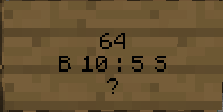
Price examples: B 10:5 S means players buy for $10 and can sell back for $5. B 5 is buy only. S free means your shop takes the item for nothing.
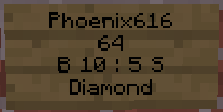
Example: put Diamonds in the chest, write 64 on line 2, B 10:5 S on line 3 and ? on line 4. Players can now buy 64 Diamonds from you for $10 and sell 64 back to you for $5.
Buying and selling from shops
Right-click a shop sign to buy. The money leaves your balance and the items go to your inventory. If the shop accepts items from players, left-click the sign to sell. The items leave your inventory and you receive the money.
Not every shop does both. Sell shops sell items to you, buy shops buy items from you, and some do both.
Player Warps
Once you have built a nice base or shop, you want other players to find it. Use /playerwarps, /pwarp or /pw to open the Player Warps menu, discover warps other players created and manage your own.
Player Warps are perfect for:
If you are creating a shop, set your Player Warp directly outside the shop entrance so players can teleport straight in and start trading.
How everything works together
You could start with a tiny house and eventually run one of the largest marketplaces on the server.
Build whatever you want
The Overworld is not just somewhere to place chests. It is your permanent place in Sky SMP. Build houses, massive bases, towns, team headquarters, farms, castles, shopping districts, public builds and community areas. Because your land can be claimed, you never need to hide what you build.
Sky SMP vs Shop Survival
Sky SMP is not another Shop Survival world. In Shop Survival, hiding your base matters because other players can find and raid you. In the Sky SMP Overworld you claim and protect your base, so the focus shifts to building, trading, shops, Player Warps and community. Your progression happens across the 10 dimensions, and your Overworld base is your permanent home.
Getting started
Sky SMP is not only about reaching the final dimension. Build your home, create your own economy, trade with other players, grow your community and conquer all 10 dimensions.
Keep reading
Sky SMP combines progression across 10 unique dimensions with an SMP Overworld where you can build a permanent home, protect your land, create shops, trade with other players and build your own community. This guide covers everything you need to get started.
How does Sky SMP work?
Sky SMP has two main parts: the 10 dimensions, where your progression happens, and the Overworld, which is your home. To get to the Overworld, use /rtp. It teleports you to a random spot in the Overworld, ready to explore and find a place to build.
The 10 dimensions
You start in the first dimension and work your way through all 10 by mining resources, leveling up your mining, upgrading your armor and sword, completing progression requirements and unlocking the next dimension. You get stronger as you go.
Each dimension has its own floating islands, resources, mines, equipment and progression.
Your ultimate goal is to reach Fungal, the final dimension.
The Overworld SMP
The Overworld is where the actual SMP side of Sky SMP happens. Type /rtp whenever you want to head there. Instead of hiding your base somewhere like in Shop Survival, you can claim your land and protect everything you build.
In the Overworld you can:
The easiest way to think about it: Dimensions are for mining, progressing, upgrading and unlocking. The Overworld is for building, protecting, storing, trading and socialising.
Claiming your land
Before you start building, claim your land. Claiming protects your base from other players.
To create a claim, take a Golden Shovel and right-click one corner of the area you want. Walk to the opposite corner and right-click again. Everything between those two points becomes your protected land.
You can also type /claim <radius>, for example /claim 20, to create a claim around where you are standing.
To check whether an area is already claimed, right-click the ground with a Stick. To see all of your claims, use /claims.
Expanding a claim
As your base grows, make your claim bigger. Use your Golden Shovel, select one of your existing claim corners and move it to its new position. Or face the direction you want to expand and use /extendclaim <blocks>, for example /extendclaim 10.
Removing a claim
Stand inside your claim and use /unclaim. To remove every claim you own, use /unclaimall.
Be careful with /unclaimall. It removes all of your claims at once.
Building with friends
Use /trust <username> to let a player build and break blocks inside your claim. There are different levels of access:
Only give Permission Trust to players you completely trust.
To remove someone's access use /untrust <username>. To see who has access, use /trustlist.
Creating your own shop
One of the biggest parts of the Overworld is the player economy. Anyone can build a physical shop with a Chest and a Sign. Turn your house into a small shop or build an entire marketplace.
Step 1: place a chest on the ground where you want your shop and put the items you want to sell inside it.
Step 2: place a sign one block away from the chest, for example above it, and write on it:
Price examples: B 10:5 S means players buy for $10 and can sell back for $5. B 5 is buy only. S free means your shop takes the item for nothing.
Example: put Diamonds in the chest, write 64 on line 2, B 10:5 S on line 3 and ? on line 4. Players can now buy 64 Diamonds from you for $10 and sell 64 back to you for $5.
Buying and selling from shops
Right-click a shop sign to buy. The money leaves your balance and the items go to your inventory. If the shop accepts items from players, left-click the sign to sell. The items leave your inventory and you receive the money.
Not every shop does both. Sell shops sell items to you, buy shops buy items from you, and some do both.
Player Warps
Once you have built a nice base or shop, you want other players to find it. Use /playerwarps, /pwarp or /pw to open the Player Warps menu, discover warps other players created and manage your own.
Player Warps are perfect for:
If you are creating a shop, set your Player Warp directly outside the shop entrance so players can teleport straight in and start trading.
How everything works together
You could start with a tiny house and eventually run one of the largest marketplaces on the server.
Build whatever you want
The Overworld is not just somewhere to place chests. It is your permanent place in Sky SMP. Build houses, massive bases, towns, team headquarters, farms, castles, shopping districts, public builds and community areas. Because your land can be claimed, you never need to hide what you build.
Sky SMP vs Shop Survival
Sky SMP is not another Shop Survival world. In Shop Survival, hiding your base matters because other players can find and raid you. In the Sky SMP Overworld you claim and protect your base, so the focus shifts to building, trading, shops, Player Warps and community. Your progression happens across the 10 dimensions, and your Overworld base is your permanent home.
Getting started
Sky SMP is not only about reaching the final dimension. Build your home, create your own economy, trade with other players, grow your community and conquer all 10 dimensions.